
Book a walkthrough

ClinicOS · AI operations for dental practices

AI that runs the front-office routine, so your desk handles the exceptions.

ClinicOS connects to the systems your practice already uses to process intake, run recalls, fill cancellations and keep records synchronized. Routine work runs automatically. Exceptions go to your team.

Built in Canada · Works with your existing PMS · Every action logged · Managed by Entoura

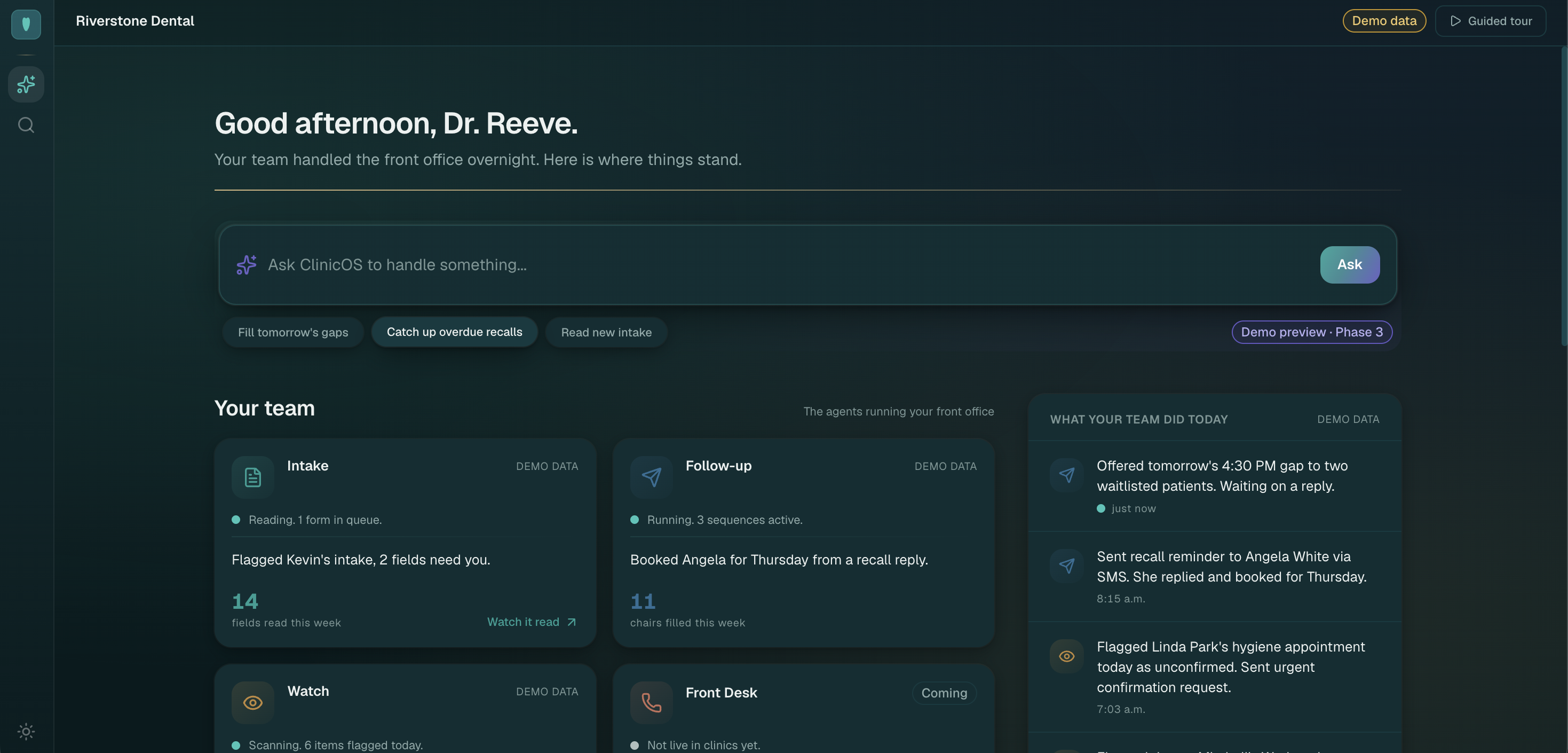
The ClinicOS Command Center: overnight activity, recall queue, schedule gaps, exceptions, and a full activity history.
Command Center · Riverstone Dental demo (fictional practice)
  • Handled overnight Tasks completed while the desk was closed
  • Recall queue Overdue patients in active follow-up
  • Schedule gaps Open slots matched to waitlist
  • Exceptions Cases waiting for staff approval
  • Activity history Full log of every system action

Outcomes

The work your team should not have to repeat.

ClinicOS runs the workflows and gives your staff one place to supervise them, not another system to maintain.

Fewer unfilled chairs

Cancellations matched to waitlist patients before the slot sits empty.

More overdue recalls moving

Follow-up runs through your configured channels until a patient responds or staff takes over.

Less intake re-keying

Forms and insurance read into the chart instead of typed twice at the desk.

Fewer records out of sync

Patient data reconciled across the systems your practice already runs.

Staff handle exceptions

Ambiguous cases and approvals go to your team. Routine work does not.

First live [Business]OS

ClinicOS is the operating layer for how a dental practice actually runs.

ClinicOS is Entoura's first productized [Business]OS, a custom operating system for clinics, built on top of the PMS you already use. Intake, recalls, waitlist fill, and the front-desk work that repeats: one connected layer, owned by the clinic, managed by Entoura.

Read about the [Business]OS concept

Workflows

One managed system for the work that repeats.

Patient intake

What ClinicOS does

Reads new patient forms, insurance cards, and referrals. Extracts structured fields and prepares chart updates, source-cited.

What stays under staff control

Staff review flagged fields and approve before anything writes to the record.

Recall and follow-up

What ClinicOS does

Identifies overdue and lapsed patients. Runs multi-touch outreach through your configured channels.

What stays under staff control

You set recall rules, message templates, and escalation paths. Staff pause or override any sequence.

Waitlist and cancellation fill

What ClinicOS does

Detects schedule gaps and matches waitlisted patients to open slots based on your rules.

What stays under staff control

Staff confirm bookings when protocol requires it. Nothing moves without the approval rules you configure.

Records synchronization

What ClinicOS does

Reconciles patient data between connected systems so the desk stops copy-pasting between screens.

What stays under staff control

Conflicts and low-confidence matches route to staff. Sync scope is defined in your Blueprint.

Daily operations summary

What ClinicOS does

Compiles what ran overnight: tasks completed, queues cleared, gaps filled, and items waiting for a person.

What stays under staff control

Your team opens one surface each morning instead of checking five systems.

Exception and approval queue

What ClinicOS does

Collects every case that needs human judgment: ambiguous intake, failed sync, outreach replies, and policy edge cases.

What stays under staff control

Nothing clinical is decided by automation. Staff approve, edit, or reject before any action completes.

Use cases

Built around how a dental practice operates.

Practice owner

  • See schedule leakage and recovered activity in one view
  • Review system performance against the workflows you scoped

Office manager

  • Configure rules, channels, and approval thresholds
  • Resolve exceptions and monitor queue health

Front desk

  • Start each day with prioritized work, not a blank inbox
  • Stop re-keying forms that ClinicOS already read
  • Approve ambiguous cases before they update the record

Integrations

Built around the systems already running your practice.

ClinicOS sits on top of your PMS. It does not replace it. Integration scope is confirmed in your Clinic Blueprint before anything connects.

Available in the live demo

  • Live demo workflows Intake, recall follow-up, schedule monitoring, and exception routing are running in the Riverstone Dental demo instance (fictional practice).

Assessed during Clinic Blueprint

  • ClearDent Integration path assessed and scoped during Clinic Blueprint.
  • Dentrix Integration path assessed and scoped during Clinic Blueprint.
  • Open Dental Integration path assessed and scoped during Clinic Blueprint.
  • Jane Integration path assessed and scoped during Clinic Blueprint.

Custom integration possibilities

Other PMS platforms, scheduling tools, or form systems can be scoped during Blueprint. Feasibility, data access, and timeline are confirmed before quoting setup.

Implementation

Configured for your clinic. Introduced under supervision.

  1. 01
    Map workflows and systems

    Your front-office tasks, approval points, and the PMS and tools already in place are documented.

  2. 02
    Configure protocols and approval rules

    Recall cadence, intake thresholds, messaging templates, and what requires a person before it runs.

  3. 03
    Connect and train each workflow

    Agents trained on your protocols and wired into scoped integrations. Each workflow tested in isolation.

  4. 04
    Run in supervised mode

    Your team reviews every action before it completes. Rules are adjusted based on what the desk actually sees.

  5. 05
    Move approved tasks into managed operation

    Routine work runs on its own within the gates you set. Exceptions still route to staff.

  6. 06
    Measure time and operational outcomes

    Track queue volume, recall movement, gap fill, and desk hours against the baseline from Blueprint.

Control and security

Your clinic stays in control. Every action is logged.

ClinicOS is a managed operations layer, not a black box. Staff approve exceptions. Production data is hosted in Canada. Your clinic records are not used to train shared models.

Proof

One complete workflow, shown end to end.

Every number here is demo data, with no invented testimonials or customer metrics. The Riverstone Dental demo is a fictional practice with realistic workflow data. Walk through the live Command Center or follow the intake example below.

Patient intake · demo example

  1. 1
    New patient form arrives

    A PDF intake form lands in the queue overnight.

  2. 2
    ClinicOS reads and extracts

    Fields extracted with source citations and confidence scores. Low-confidence items flagged.

  3. 3
    Staff reviews exceptions

    Front desk approves flagged fields. Nothing writes to the chart without sign-off.

  4. 4
    Record updated

    Approved data syncs to the patient chart. Activity logged in the audit history.

Open the live demo
What the system handled today (demo data)
  • Read a new patient form into the chart
  • Queued recall outreach for 12 overdue patients
  • Filled a hygiene gap from the waitlist
  • Flagged a chart that needs your team

What it costs

Real numbers, written down.

Blueprint and setup are quoted up front. After go-live, Entoura manages your instance for a managed monthly fee scoped to your workflows.

01

Clinic Blueprint

$2,500 2–4 weeks

Your workflows, PMS integration, and agents are scoped. You get a fixed quote for setup. Credited if you proceed.

You own
You receive a scoped plan, integration assessment, and fixed setup quote.
Entoura manages
Entoura runs the Blueprint engagement and delivers the scope document.
02

Setup and installation

Fixed quote 4–6 weeks typical

Your agents are custom-trained, wired into your PMS, and your instance is stood up in the clinic.

You own
You own the configured instance, trained agents, and integration mappings.
Entoura manages
Entoura builds, installs, and validates each workflow before supervised mode.
03

Managed operation

Managed monthly fee Ongoing

After go-live, Entoura runs, monitors, patches, and improves your agent team for a managed monthly fee scoped to the workflows your clinic runs.

You own
You own and control your ClinicOS instance. Cancel anytime.
Entoura manages
Entoura operates the running system: uptime, queue monitoring, rule adjustments, and integration maintenance.

Exact setup quote depends on the workflows you take and your PMS.

Frequently asked

Straight answers.

Does ClinicOS replace the PMS?

No. ClinicOS is a managed AI operations layer wired into the practice management software you already use. Your PMS stays in place. ClinicOS handles the repetitive front-office workflows on top of it.

Which systems can it connect to?

ClearDent, Dentrix, Open Dental, and Jane are assessed during your Clinic Blueprint. The exact integration path depends on your PMS version and the workflows you take. Other systems can be scoped as custom integrations.

Does AI contact patients without approval?

Outbound patient contact follows the rules you configure. Messages can require staff approval before they send. ClinicOS does not answer phones or run voice AI. If your practice records calls, transcripts can route into intake and follow-up workflows.

Where is clinic data hosted?

Application data is hosted in Canada, which reduces cross-border exposure. What reaches a model, what stays local, and what gets logged is set in writing in your Clinic Blueprint.

What does the clinic own?

You own and control your ClinicOS instance and the data in it. Entoura builds, installs, and manages it for you. The instance stays yours, cancel managed operation anytime.

How is the system introduced safely?

Every clinic starts in supervised mode. Your team reviews actions before they complete. Workflows move to managed operation only after you approve the rules and the desk is comfortable with what the system does.

What about maintenance and support?

Managed operation is the normal ClinicOS model after go-live. Entoura runs, monitors, patches, and improves your agent team for a managed monthly fee scoped to the workflows your clinic runs. You own and control the instance, cancel anytime.

Next step

See how ClinicOS would work inside your practice.

The call walks through the live Command Center, identifies one repeated workflow, and determines whether ClinicOS is a practical fit.

Book a 30-minute walkthrough